Windows 11 KB5067036 Update Introduces Administrator Protection and Redesigned Start Menu
Microsoft’s Windows 11 KB5067036 preview update rolls out a new Administrator Protection feature to enhance security and delivers a redesigned Start Menu for improved usability and navigation.
 Sandhya
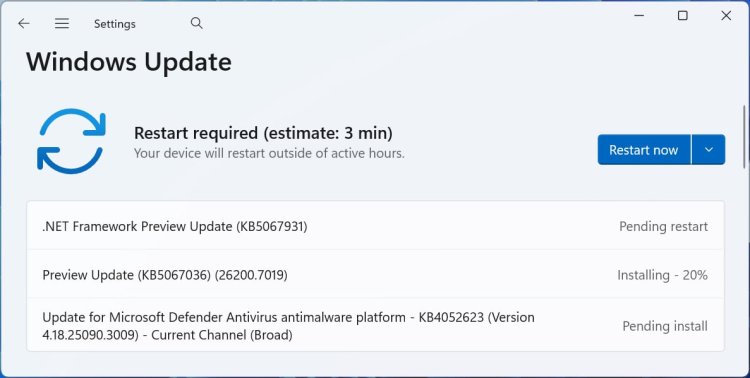
Microsoft has released the KB5067036 preview cumulative update for Windows 11 versions 24H2 and 25H2, beginning the gradual rollout of two major features: a new Administrator Protection security layer and an updated, more intuitive Start Menu design.
This optional, non-security preview update is part of Microsoft's monthly testing cycle and is intended to prepare users for the upcoming November Patch Tuesday. Unlike usual cumulative updates, this release does not include security fixes and requires manual installation unless automatic updates are enabled.
Users can install the update via Settings > Windows Update > Check for updates or directly from the Microsoft Update Catalog.
Key Features in KB5067036
Upon installation, Windows 11 24H2 systems upgrade to build 26100.5074 and 25H2 systems to 26100.7019. The update addresses several bugs and introduces significant enhancements:
Administrator Protection: Reinforcing System Security
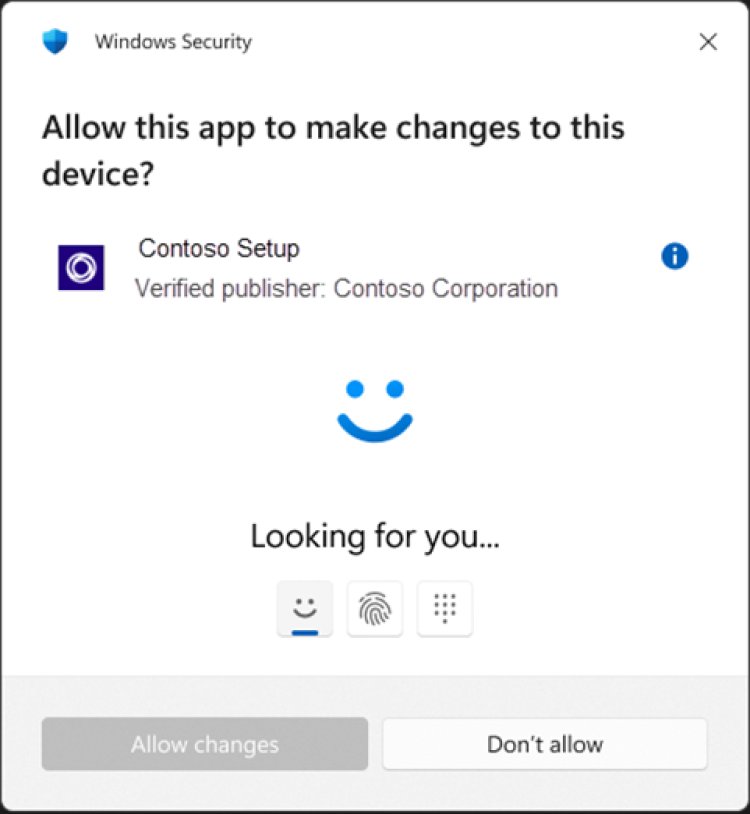
The headline feature of this release is Administrator Protection, designed to reduce the risk of unauthorized or accidental system-level changes. It mandates that users verify their identity through Windows Hello integrated authentication before actions requiring admin privileges can proceed.
Actions subject to this verification include:
Installing software
Changing critical system settings (e.g., time, registry)
Accessing sensitive data
This feature aims to prevent malware or unauthorized programs from silently executing commands that could compromise system integrity, while also protecting users from making unintentional configuration changes.
Redesigned Start Menu: Faster Access and Smarter Layout
The update enhances the Start Menu with a fresh layout, improving app discovery and categorization:
New categories and grid views help group apps logically and showcase frequently used apps.
A scrollable “All” section makes navigating large app libraries more seamless.
The layout adapts responsively to screen size, optimizing space for pinned and recommended sections.
Users can customize views under Settings > Personalization > Start.
These refinements aim to streamline workflows and make it easier than ever to find and launch apps.
Additional Important Fixes
KB5067036 also resolves several quality-of-life bugs and performance issues:
Fixes an ACCESS_DENIED error when changing passwords remotely on certain devices.
Addresses issues with the Kerberos Key Distribution Center (KDC) on server domain controllers.
Rectifies rendering problems with text fields in specific apps.
Resolve crashes in media creation tools on Arm64 devices.
Fixes playback errors for protected media content.
Corrects UI inconsistencies and unresponsiveness in File Explorer and context menus.
Introduces battery icon improvements on the lock screen and taskbar for easier charge status monitoring.
Renames “Email & accounts” to “Your accounts” for clearer account management.
Adds integration improvements for Microsoft 365 Copilot learning experiences.
Microsoft confirms no known issues are currently tied to this update.
How to Get KB5067036
To receive the update, manually check for optional updates in Windows Update or download it from the Microsoft Update Catalog portal. Because it is an optional preview release, users can choose to delay installation if preferred.
Final Thoughts
KB5067036 marks an important step forward in Windows 11’s security and usability roadmap. Administrator Protection offers crucial safeguards for system integrity in today’s threat landscape, while the Start Menu redesign enhances the user experience across devices.
For users and IT admins alike, testing this update early offers a preview of the November patch cycle’s benefits and helps prepare for broader deployment of Microsoft’s latest Windows 11 improvements.